Capture the observed state
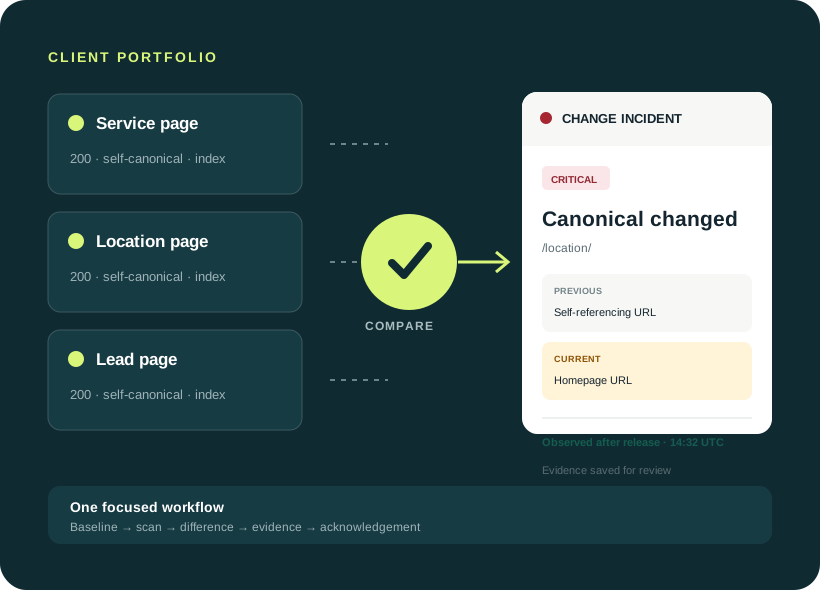
Status 200, self-referencing canonical, indexable directives, expected title, H1 and schema.
Know when a deployment changes a canonical, adds noindex, breaks a redirect, or turns an important page into a 404. See the earlier value, the new value, and the time the change appeared.
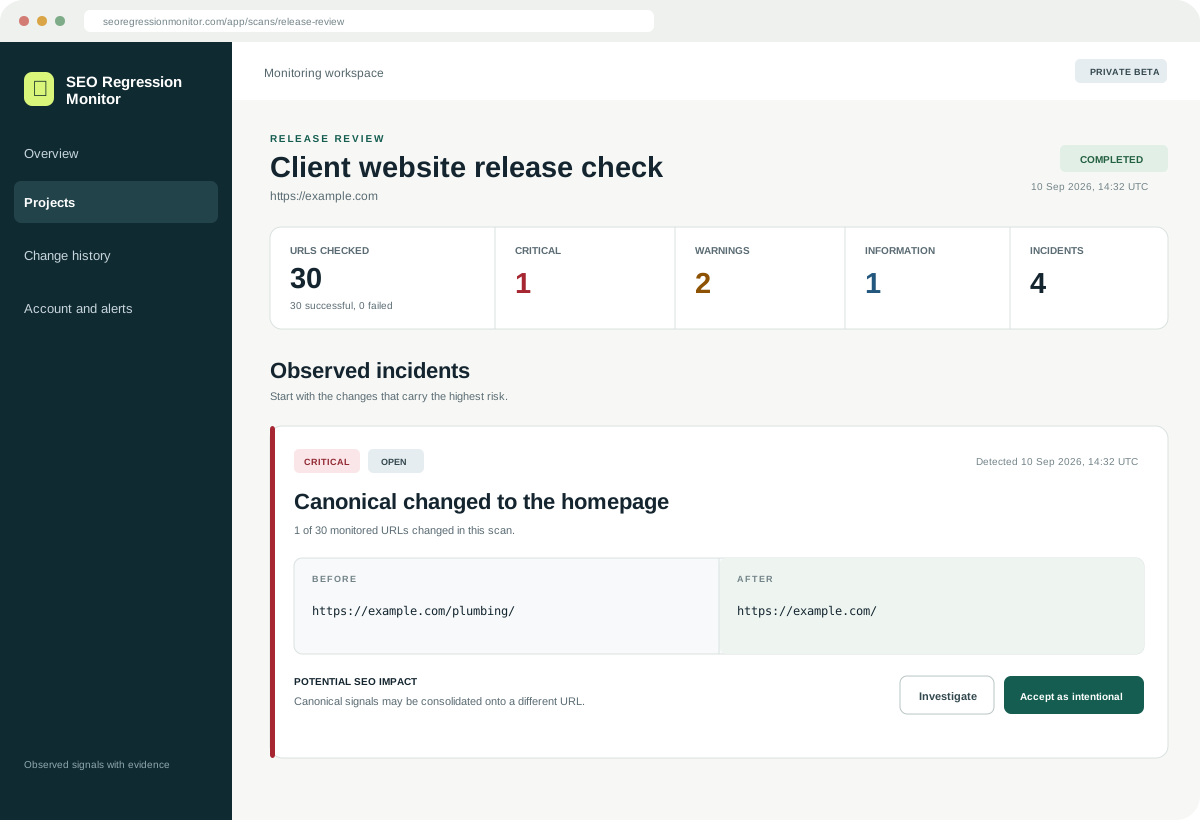
https://example.com/plumbing/The page canonical changed from self-referencing to the homepage.
Built for the moments after a
A release review combines scan coverage, severity, affected monitored URLs, lifecycle status, and exact before and after values. Your team can investigate the evidence without rebuilding the timeline by hand.
SEO Regression Monitor watches selected public pages for technical changes that a normal visual review can miss. It compares successful observations and reports evidence from the live page. It does not guess rankings or claim that Google has indexed a URL.
Status 200, self-referencing canonical, indexable directives, expected title, H1 and schema.
Canonical now points to the homepage. The exact previous value, current value and detection time are preserved.
Prioritize the incident, investigate the release, and acknowledge intentional work without erasing history.
The value comes from a reliable record across client websites: the earlier state, the release check, the important differences, and the review decision.
Monitor the small set of pages that protect leads and revenue. A fresh check records the technical state, compares it with the last successful observation, and groups the evidence your team needs to investigate.
You do not need to install a crawler or paste private credentials. The beta reads public pages only and asks for a simple ownership tag before persistent monitoring features.
Add the website and give each client or owned site its own monitoring record.
Paste pages manually or verify the site and select candidates discovered from its sitemap.
The first successful response becomes the observed state used for later comparison.
Run a post-deployment check, review severity and before/after evidence, then acknowledge intentional work.
The highest-value moment is shortly after production changes, while the team can still connect a regression with the work that shipped.
Check the pages touched by a release while the developer still has the change in context.
Catch a theme or SEO plugin changing canonicals, robots directives, headings or schema.
Keep a dated record of status, redirect, canonical and sitemap changes on priority URLs.
Review the highest-risk changes first without reopening a full crawler for every client.
Every result is a state change with evidence. Harmless whitespace and formatting differences are normalized to reduce noise.
Catch important pages changing from healthy responses to redirects, 404s or server errors.
Detect new noindex and X-Robots-Tag directives with the exact value that changed.
See when a self-referencing canonical disappears or starts pointing somewhere unexpected.
Track material title, H1 and content loss, hreflang changes, mobile viewport removal and structured data.
Review meaningful access-rule changes while ignoring comments and harmless formatting.
Know when an important monitored URL is removed from the submitted sitemap set.
The report separates an observed technical change from its possible SEO impact. It never claims to know Google’s index state without Search Console data.
“The canonical on /plumbing/ changed from self-referencing to the homepage.”
Canonical and robots checkers are already free. The commercial job is maintaining a trusted release record across clients: priority pages, previous state, new state, severity, scan coverage and review status in one workspace.
Current beta boundary: manual release checks, daily monitoring for verified projects, grouped in-app incidents and history work now. Grouped email delivery and signed deployment hooks are the next commercial milestone.
Clear answers about baselines, website access, scan limits and how this fits with the SEO tools you already use.
It records the technical SEO state of an important page and compares that state with a later observation. Instead of listing every possible SEO issue, it shows the fields that changed, their previous and current values, and when the change was detected.
Create a project, add the public URLs you care about, and run the first check to create an observed baseline. Run another check after a deployment, migration, CMS edit or plugin update. If a monitored signal changed, the app creates a severity-rated record with clear before and after evidence.
Start with pages where an unnoticed technical change could affect leads, sales or an important client result: the homepage, service and location pages, category pages, product pages, pricing pages and major organic landing pages. The beta intentionally focuses on a small priority set instead of crawling an entire site.
The current beta checks HTTP status and redirects, final URL, meta robots and X-Robots-Tag, canonical URL, title, meta description, H1, content loss, hreflang, mobile viewport, structured-data presence and types, robots.txt changes, and sitemap membership for monitored URLs.
A one-time checker describes the page now. Regression monitoring remembers an earlier successful observation and shows what changed during a later check. Its value is the timeline and review workflow across client sites, not access to a secret SEO tag.
No. Search Console reports how Google crawls, indexes and serves your site, while rank trackers measure search-position outcomes and full audits find broad opportunities. This product records changes on the live website that may explain a later outcome. Google Search Console integration is planned, but is not active in the current beta.
No. The first successful scan is an observed baseline, not a certification. If the baseline already contains a mistake, the app records it faithfully and compares future observations with it.
Deterministic rules prioritize transitions such as a healthy page becoming a 404 or 500, an indexable page gaining noindex, or a self-referencing canonical changing to an unrelated URL. Values are normalized first so harmless whitespace and directive formatting do not create unnecessary alerts.
Verification reduces abuse before persistent monitoring and sitemap discovery are allowed. Add the supplied public verification tag to the homepage and run the ownership check. The token proves control of the website but cannot access your account or change your site.
No. It only reads public responses and records observed changes. It never edits canonicals, robots.txt, redirects, content, plugins or DNS. The website owner decides how to investigate and fix a regression.
Verified and active projects are eligible for a conservative daily check. You can also run a focused post-deployment check after a release. Grouped email delivery remains disabled until the sender domain and delivery path are verified.
Yes, after website verification. The importer follows bounded sitemap indexes, finds up to 1,000 candidate URLs, and lets you choose which ones to monitor. It does not automatically add every URL or turn a large site into an unlimited crawl job.
Create a baseline for up to 10 important URLs per project. No payment details are requested during beta.